DonutCountyAP Setup Guide
Requirements:
- Donut County on Windows or Linux
- BepInEx 5.4.* (Unity Mono x64)
- DonutCountyAP
Installation
Install BepInEx:
- Extract the BepInEx
.ziparchive into your Donut County install folder- On Steam, you can right-click the game, "Manage" → "Browse local files"
- Linux-exclusive setup:
- In the game's properties on Steam, set launch options to
WINEDLLOVERRIDES="winhttp=n,b" %command%to give BepInEx loading priority.
- In the game's properties on Steam, set launch options to
- Start the game to allow BepInEx to create its folders.
Install the mod:
- Extract the mod download in the
BepInEx/plugins/folder of the game install folder - Start the game.
- If the game is successfully modified, you will see a "Connect" button on the titlescreen, among other modified UI elements.
Once you've installed everything it should look like this:
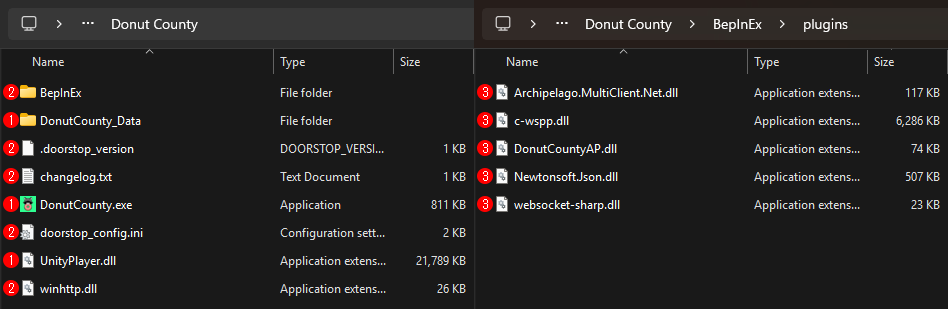
(1) From Donut County. (2) From BepInEx. (3) From DonutCountyAP.
Usage
To connect, simply enter your connection info on the titlescreen and press "Connect". Once connected, you can use the level select to play the game.
The mod stores an additional randomizer.json save file in the game save folder, but this data is relatively small.